Unlock the Power of Artificial Intelligence, Machine Learning, and Data Science with our Blog
Discover the latest insights, trends, and innovations in Artificial Intelligence (AI), Machine Learning (ML), and Data Science through our informative and engaging Hubspot blog. Gain a deep understanding of how these transformative technologies are shaping industries and revolutionizing the way we work.
Stay updated with cutting-edge advancements, practical applications, and real-world use.
Tuesday, 17 March 2026
Implementing Multi-Modal RAG Systems
Implementing Multi-Modal RAG Systems Image by Author | Ideogram
Large language models (LLMs) have evolved and permeated our lives so much and so quickly that many we have become dependent on them in all sorts of scenarios. When people understand that products such as ChatGPT for text generation are so helpful, few are able to avoid depending on them. However, sometimes the answer is inaccurate, prompting an output enhancement technique such as retrieval-augmented generation, or RAG.
RAG is a framework that enhances the LLM output by incorporating real-time retrieval of external knowledge. Multi-modal RAG systems take this a step further by enabling the retrieval and processing of information across multiple data formats, such as text and image data.
In this article, we will implement multi-modal RAG using text, audio, and image data.
Multi-Modal RAG System
Multi-modal RAG systems involve implementing multiple dataset types to achieve better output by accessing our knowledge base. There are many ways to implement them, but what’s important is to create a system that works well in production rather than one that is fancy.
In this tutorial, we will enhance the RAG system by building a knowledge base with both image and audio data. For the entire code base, you can visit the following GitHub repository.
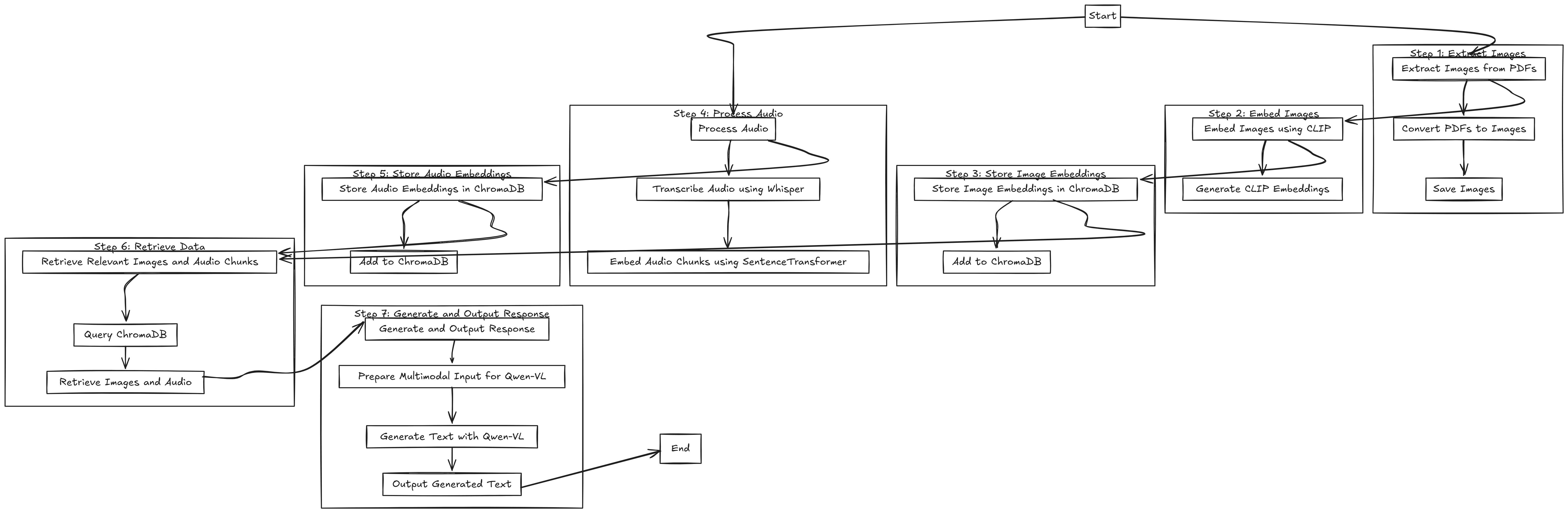
The workflow can be summarized in the image below.
Multi-modal RAG system workflow implementation summary (click to enlarge)
It’s a bit small to read as it is, so click to enlarge or save and zoom in as required. The workflow can be summarized into seven steps, which are:
Extract Images
Embed Images
Store Image Embeddings
Process Audio
Store Audio Embeddings
Retrieve Data
Generate and Output Response
As this will require high resources, we will use Google Colab with access to a GPU. More specifically, we will use the A100 GPU, as the RAM requirement for this tutorial is relatively high.
Let’s start by installing all the libraries that are important for our tutorial.
You can visit the PyTorch website to see which one works for your systems and environment.
Additionally, there are times when image extraction from PDF does not work correctly. If this happens, you should install the following tool.
apt-get update
apt-get install-ypoppler-utils
With the environment and the tools ready, we will import all the necessary libraries.
import os
from pdf2image import convert_from_path
from PIL import Image
import chromadb
from chromadb.utils.embedding_functions import OpenCLIPEmbeddingFunction
import torch
from transformers import CLIPProcessor,CLIPModel,WhisperProcessor,WhisperForConditionalGeneration,Qwen2VLForConditionalGeneration,Qwen2VLProcessor
import librosa
from sentence_transformers import SentenceTransformer
from qwen_vl_utils import process_vision_info
from IPython.display import display,Image asIPImage
In this tutorial, we will use both the image data from the PDFs and the audio files (.mp3) that we prepared previously. We will use the Short Cooking Recipe from Unilever for the PDF file and the Gordon Ramsay Cooking Audio file from YouTube. You can find both files in the dataset folder in the GitHub repository.
Put all the files in the dataset folder, and we are ready to go.
We will start by processing the image data from a PDF file. To do that, we will extract each of the PDF pages as an image with the following code.
Once all the images are extracted from the PDF file, we will generate image embedding with the CLIP model. CLIP is a multi-modal model developed by OpenAI which is designed to understand the relationship between image and text data.
In our pipeline, we use CLIP to generate image embeddings that we will store in the ChromaDB vector database later and use to retrieve relevant images based on text queries.
To generate the image embedding, we will use the following code.
Next, we will process the audio data to generate the text transcription using the Whisper model. Whisper is an OpenAI model that uses transformer-based architecture to generate text from audio input.
We are not using Whisper for embedding in our pipeline. Instead, it will only be responsible for audio transcription. We will transcribe them in chunks before we use sentence transformers to generate embeddings for the transcription chunks.
To process the audio transcription, we will use the following code.
With everything in place, we will store our embeddings in the ChromaDB vector database. We will separate the image and audio transcription data as they have different embedding characteristics. We will also initiate the embedding functions for both the image and audio transcription data.
Retrieved Audio Chunks:[" Lemon. Zest the lemon. Over. Smells incredible. And then finally seal the deal with a touch of grated parmesan cheese. Give your veg some attitude and you'll get amazingly elegant dishes on a budget that are always guaranteed to impress. What more do you want from great cooking? Cheap to make, easy to cook and absolutely stunning. For me, food always has to be impressive. But when it comes to desserts,"," and one third of your protein, chicken. With a dish that takes literally minutes to put together, it's really important to get everything organized. Everything needs to be at your fingertips. Touch of olive oil. Get that pan really nice and ready. Just starting to smoke. Drop the chicken in first. Just salt, pepper. Open up those little strands of chicken."]
For image retrieval, it will return the metadata image path we stored in the vector database. For audio retrieval, it returns the transcription chunk most related to the text query.
With the data retrieval, we will set up the generative model using the Qwen-VL model. The model is a multi-modal LLM that can handle text and image data and generate text responses from the multi-modal data we pass into it.
We use the Qwen-VL model, which generates multimodal text responses by taking both retrieved images and audio transcription chunks.
1.**Lemon**-Providesaburst of citrus flavor andisagood source of vitaminC.
2.**Parmesan Cheese**-Agood source of calcium andprotein.
3.**Chicken**-Alean protein source that isrich inessential amino acids.
4.**Olive Oil**-Ahealthy fat that isrich inmonounsaturated fatty acids.
5.**Zest**-Addsaburst of flavor
As you can see, the result takes into account both the image and audio data.
That’s all you need to build a multi-modal RAG system. You can change the file and code to accommodate your needs.
Conclusion
Retrieval-augmented generation, or RAG, is a framework that enhances LLM output using external knowledge. In multi-modal RAG systems, we utilize data other than simple text, such as image and audio data.
In this article, we have implemented multi-modal RAG using text, audio, and image data. We are using CLIP for image embeddings, Whisper for audio transcription, SentenceTransformer for text embeddings, ChromaDB for vector storage, and Qwen-VL for multimodal text generation.






No comments:
Post a Comment